Multicolumn Dropdown jQuery Plug-in Released!
Back in April, I posted a preview of a multicolumn dropdown plug-in I was developing for a project at work. Well today we finally officially released the mcDropdown plug-in. I was hoping to release the plug-in sooner, but other projects took precedence and releasing it just got delayed.
I'm really proud of the plug-in and think it provides a really unique form control.
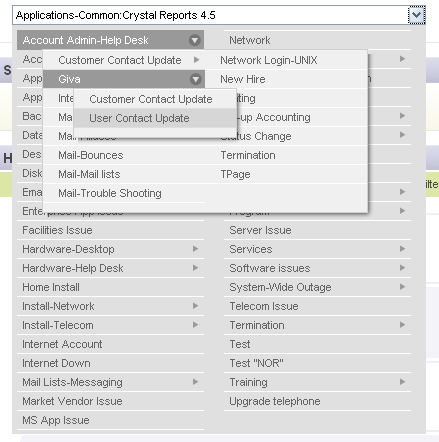
Here's a list of the features:
- Creates a multi-column hierarchical select UI component
- Binds a text input field or div element to a list element (included nested lists)
- Menus are automatically split into columns as needed
- Menus are positioned to always stay on the screen
- Autocomplete keyboard entry (only valid options are allowed)
- Menu automatically scrolls into viewport when opened
You can view a live example over at the plug-in page.
mcDropdown jQuery Plug-in
If you like what you see, make sure to digg it.

Comments
I like this multi-column dropdown. Is it possible to create a custom tag in which one would create the unordered list in JavaScript instead of using HTML? Is this license ok for an intranet use?
Anything's possible. We currently use a custom tag to generate all the required HTML and JavaScript. Personally, if you're going to wrap all the functionality into a custom tag, I'd stick with generating the unordered list as HTML. Depending on the depth of your tree, it could take significant time for the browser to render a large list. Generating the HTML outright will speed things up a lot.
for example if i choose Arts & Humanities: Photography: Digital how should i make to show a content of it and how should i do this?
its basic question never the less...
thx!
See this thread for information on using the select event--which is what you'd use to trigger some action when the control changes values:
http://blog.pengoworks.com/index.cfm/2008/6/26/mcD...